In my last post I said I was building a small admin site I could pull up on my phone, with a to-do list of the things only a person can do. It’s built and it’s live. This is how it works.
A quick recap of the arrangement. Claude Code does the research legwork for my family history project, and I’m the hands and feet. It can’t log into FamilySearch and fix a wrong birth date. It can’t run a Newspapers.com search. It definitely can’t walk a cemetery in Alabama. So it writes those jobs down for me, with the exact steps, and waits.
For a while, “writes them down” meant a Markdown file in the repo. That works fine at my desk. It does not work in a doctor’s waiting room, which is where I actually have twenty spare minutes.
The to-do list still starts life as that Markdown file. Every item has a stable ID with a prefix that says what kind of job it is: FS for a FamilySearch correction, FG for a Find a Grave check, SEARCH for a search I have to run myself, VISIT for a place to go, ASK for something that only lives in my head or on my computer. A script turns the file into JSON on every commit, and the site loads that JSON when it deploys. The admin never invents a to-do. It only shows me what Claude Code wrote.
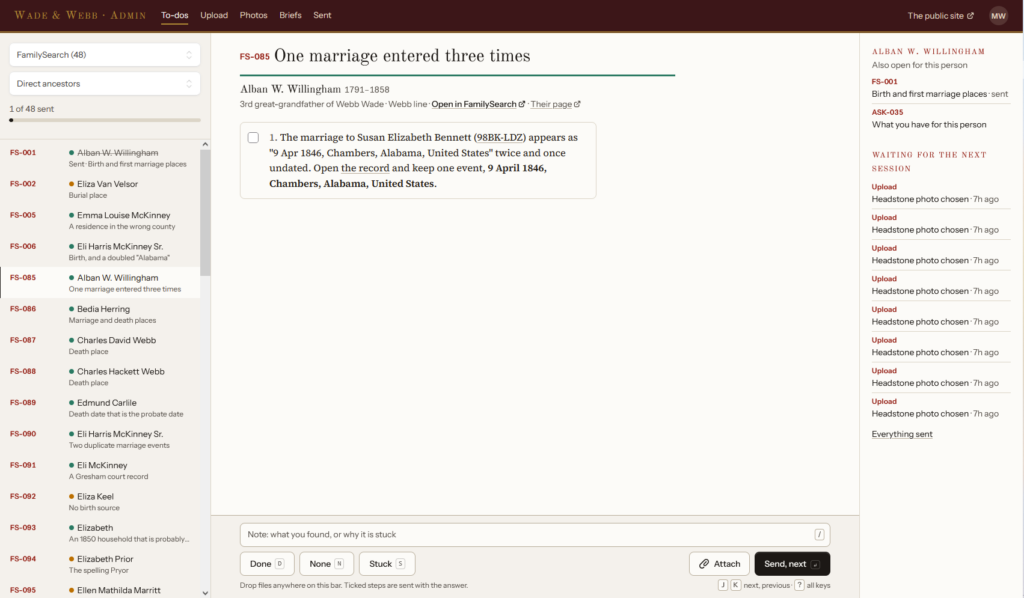
Working through a batch of FamilySearch corrections on the desktop.
I picked a layout called “Work through a batch.” A batch is one kind of job for one slice of the family. FamilySearch corrections for my direct ancestors, say, or everything on the Webb line. On a desktop it sits on my second monitor beside FamilySearch, with the batch down the left, the to-do in the middle with its steps as tick boxes, and an answer dock at the bottom. There are keyboard shortcuts, because clicking Done a couple hundred times is its own kind of tedium. J and K move through the list, D is done, N is none, S is stuck.
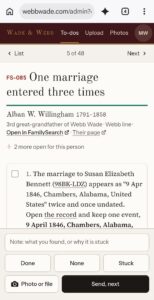
On the phone it’s one to-do per screen, with the answer dock pinned to the bottom next to a camera button.
The same to-do on my phone.
The answers are few on purpose. Done, None, or Stuck, and Stuck won’t send without a note saying why. A search gets Hit or No hit, and a hit needs a clipping URL or a file to back it up. I can attach up to ten photos or PDFs to any answer.
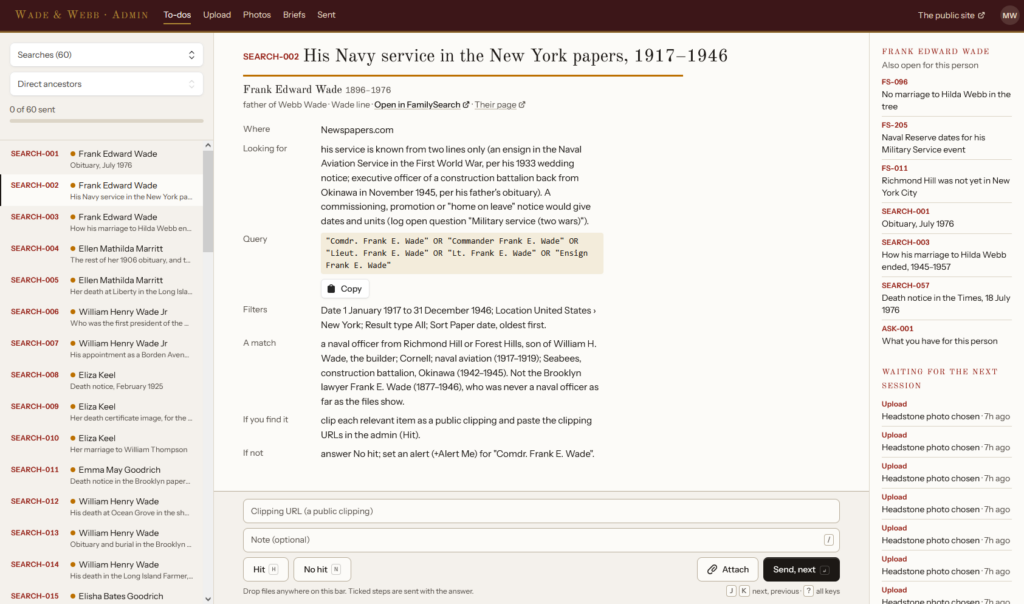
The search to-dos are the ones that sold me on the whole idea. Each one says who it’s for and why, gives the exact query, the filters to set, what a real match looks like, and what to do with a hit or a miss. There’s a copy button on the query. I don’t have to think, which is the point.
A Newspapers.com search, written so I can run it without thinking.
Then there’s “Near me.” Any to-do tied to a place carries coordinates, so the phone can ask the browser where I am and list what’s within 5, 25, or 100 miles, nearest first. That one is for the next time I’m traveling anywhere near where the family lived.
Not everything is an answer to a to-do. Sometimes I just have a thing, like a clipping or a photo of a document. The upload page takes the files, lets me search for the people they’re about, and leaves room for a note. That’s all it asks.
Two more pages showed up because the research needed them. One is for headstone photos. When a Find a Grave memorial has several photos of the stone, nothing goes on the public site until I pick one, or say none of them will do.
The other is for what the project calls stuck-problem briefs. When the digital sources run out, Claude Code writes up what’s known, everything it checked including the dead ends, and the specific question, ready to hand to a professional genealogist. From the admin I can read a brief, download it, print it, and mark it sent or complete.
Here’s the part I like best. The admin site does not edit a single research file. The Git repo is the source of truth, Claude Code is the one who files things, and I didn’t want a web form quietly changing either of those.
My first instinct was an MCP server, because lately that’s my answer to most things. What I ended up with is simpler. Every answer or upload becomes one Git commit, made through the GitHub API, that adds a folder under inbox/ in the repo. The folder holds whatever files I attached and a small JSON note saying what it’s about. The first real one, trimmed a little, looked like this:
{
    "todo": "FS-001",
    "people": ["KV2X-YX7"],
    "answer": "done",
    "steps_ticked": [1, 2],
    "note": "I corrected both on Family Search",
    "files": []
}
The commit is built the long way. The site uploads the files as blobs, builds a tree on top of the branch’s current tree, makes the commit, then fast-forwards the branch. That means a submission lands whole or not at all. If the branch moved while I was typing, it starts over from the new head, up to three times. If it still fails, the form keeps everything I entered and tells me why.
There was one catch. The site deploys on every push to main, and these commits are pushes to main. Left alone, every time I tapped Done the whole site would rebuild. So every commit from the admin starts its message with “Inbox:” and the deploy script looks for that and quits early.
The other half happens at my desk. I start every session with the same command, /start-session. Claude Code pulls, lists what’s in the inbox, and works through it oldest first. It logs the answer in that person’s research log, files any documents, fetches the clipping if I sent a URL, closes the to-do, and removes the folder.
Until that happens, the admin shows my answer as waiting. It knows because the folder is still sitting in inbox/ on GitHub. If I got something wrong in the meantime, I can send it again as a correction.
Signing in is Google only, and only one Google account gets in. There’s no password login, no registration, no reset, nothing to forget. I’ve had a bug on other Laravel projects where that setup logs me out after about two hours, so this time fixing it was item one in the brief. The fix is one argument. Pass true as the second argument to Auth::login and it sets a remember-me cookie.
Underneath, it’s all Laravel, with Livewire for the admin pages, deployed through Forge. The public site and the admin are the same app in the same repo as the research.
None of this is clever. It’s a to-do list and an upload form. But it closes the loop. Claude Code finds what it can and writes down what it can’t. I do those jobs from wherever I happen to be, and the answers are waiting in the repo the next time I start a session. Nothing gets retyped and nothing gets lost.
The public side is at webbwade.com. You can’t see the admin, which is the idea, so the screenshots will have to do.
Say something